Showing posts with label Computers. Show all posts

Friday, June 6, 2008

MSI Wind U100


MSI Wind U100 the $560 ultra-mobile PC from MSI has finally hit the market. With so many companies getting into the market, the competition in UMPC market is getting hotter, with increasing options for the end user.

The technical specifications of the MSI Wind U100 which measures 260 mm x 180 mm x 31 mm are:
  • 10 inch display with resolution of 1024 x 600
  • Intel Atom N270 Processor (1.6 GHz)
  • Graphics Driver: Intel GMA 950
  • 1 GB DDR2 SDRAM (Windows XP), 512 MB DDR2 SDRAM (Linux) 667MHz
  • 80 GB Hard Drive SATA
  • SD, MMC, Memory Stick, Memory Stick Pro card support
  • 802.11b/g Wi-Fi
  • Bluetooth 2.0 (optional)
  • Ethernet 10/100
  • Three USB 2.0 ports
  • 1.3 mega pixel web-camera
  • OS: SUSE Linux or Windows XP
  • Battery Life: 2.5 hrs 3-cell, 5.5 hrs 6-cell
It will also sport VGA port, MIC-in and Line-out port. It weighs around 1.2kg and will be available in three colours White, Pink and Black.

It will cost $399 and $549 ie Rs 17000 and Rs 24000 in terms of direct conversion for Linux and Windows XP version respectively.

TechWorld Store - Computers, Harware, Software, Electronics, networking, communications.
TechWorldStore is a leading retailer of computer hardware and software, consumer electronics, networking and communications products. We offer the widest selection from the top brands.

Thursday, June 5, 2008

Acer Aspire One


Acer launched its $399 ultra portable notebook the Acer Aspire One.

The technical specifications of the Acer Aspire One which measures 9.8 inches x 6.7 inches x 1.14 inches are:
  • 8.9-inch display with resolution of 1024 x 600
  • Intel Atom N270 Processor (1.6 GHz)
  • Graphics Driver: Intel GMA 950
  • 512 MB or 1 GB DDR2 SDRAM
  • 80GB Hard Drive (XP) or 8GB Solid State Drive (Linux)
  • SD, MMC, Memory Stick, Memory Stick Pro, xD-picture card support
  • 802.11b/g Wi-Fi
  • Ethernet
  • Three USB 2.0 port
  • One PCI slot for WWAN
  • 1.3 mega pixel camera
  • OS: Linpus Linux Lite or Windows XP
The battery life expected is 2.5 - 5 hours for XP version and 3 - 7 hours for Linux one on 3 and 6 cell batteries respectively. It also sports a VGA port and 3.5mm audio out.

All these features at an unbelievable weight of 1 kg.
It cost $399 for Linux version and $600 for Windows version ie INR 17000 and INR 26000 respectively in terms of direct conversion.

Sunday, June 1, 2008

Hybrid Hard Drive

Hybrid Hard Drive (HHD) is a combination of the Hard Disk Drive (HDD) with a large amount of non-volatile flash memory (called as buffer memory). Its just like a Hybrid Car that can run on both batteries as well as fossil fuel as and when required for greater efficiency.

The flash memory in a HHD starts at a minimum of 128 MB. HHD with 256 MB buffer capacity have been developed. A prototype of HHD with 1GB buffer has also been developed. The buffer memory of HDD ranges between 2 - 16 GB. HDD with 32 MB buffer have been developed though.

Hybrid Hard Drive definitely offers better performance and lower power consumption as compared to any other HDD. Because they make use of Flash memory the data that is frequently used is stored in the Flash memory of the HHD. This reduces the time required to fetch data from the particular area of the disk. Also as Flash memory has no moving parts, the possibility of reducing the life of your hard drive due to long uses is greatly reduced.

Hard Drive usage apart from reducing power consumption, increasing life of your hard disk, reduce also the boot-up time your computer, by caching the data required by computer for next boot-up. The most significant increase in speed will be while resuming from hibernation mode. The data to resume from from hibernation mode will be stored into the buffer memory of HHD, and due to high speed of Flash Memory, it will be loaded very fast in the RAM. The difference of resuming from 'Standby' and 'Hibernation' mode may vanish, thereby making Operating System manufacturers completely do away with standby mode, and use only hibernation mode.

From the point of view of prices, Hybrid Hard Disk is definitely going to cost more than the Hard Disk Drive of same capacity. But thinking of all the advantages they offer over HDD, they are definitely worth it. Also Solid State Drive, which are much superior than either of these are very expensive. Using a Hybrid Hard Drive, will definitely be a much greener alternative to the Hard Disk Drive.

Sunday, May 4, 2008

Intel Atom Processor

Intel has developed a new processor 'Atom', with very low power requirements in the sub 3 watt range, and also while supporting a highest frequency of up to 1.86GHz. Manufactured using the new hafnium-infused 45nm high-k silicon technology, Intel Atom processors pack an astounding 47 million transistors on a single chip measuring less than 25mm², making them Intel's smallest and lowest power processors. This processor has been mainly focussed towards latest Mobile Internet Devices.

Some features of the Atom Processor are:
  • Single-core processor for mobile devices offering enhanced performance

  • On die, primary 32-kB instructions cache and 24-kB write-back data cache

  • Hyper-Threading Technology 2-threads

  • On die 512-kB, 8-way L2 cache

  • Intel® Virtualization Technology (Intel® VT)

  • Thermal management support

  • Intel® Deep Power-Down Technology

  • L2 Dynamic Cache Sizing

  • Advanced power management features including Enhanced Intel SpeedStep® Technology

The technologies used by Intel for Atom Processor are:


High Performance Technology
  • Intel® Hyper-Threading Technology: Provides performance & support for multi threaded applications enabling increased performance and system responsiveness in multitasking environments by enabling the processor to execute two instruction threads in parallel.

  • Intel® Virtualization Technology: It is a set of hardware enhancements on the Intel® Atom processor series providing the flexibility to run dual operating systems and applications in independent partitions.

  • Intel® Digital Media Boost: Enhanced Performance on Floating Point intensive applications such as CAD tools, 3D & 2D modeling, Video Editing, Digital Music, Digital Photography & Gaming

  • Intel® Smart Cache: Smarter, more efficient cache & bus design thus offering even more efficient data sharing, providing enhanced performance, responsiveness and power savings.

  • Power Optimized Front Side Bus: 533MHz FSB provides increased data bandwidth as compared to prior generations (400MHz) for faster data transfer.

  • Enhanced Data Prefetcher: Efficient speculation and loading into L2 cache of data likely to be requested by processor.

Low Power Capabilities

  • Enhanced Intel® SpeedStep® Technology: Allows for better match of performance to application demand.

  • Deep Power Down Technology with Dynamic Cache Sizing: Dynamic Cache Sizing saves power by turning off Cache ways that have had data saved in memory. This power saving feature enables 80-100mW idle power and 160-220mW average power for the processor.

  • Low Thermal Design Power: Lower thermal design power enables thinner, lighter MID devices as it reduces the cooling requirements.

  • Mobile Voltage Positioning: Dynamically lowers voltage based on processor activity to lower thermal design power.

  • Enhanced Deeper Sleep: Saves power by flushing cache data to system memory during periods of inactivity to lower CPU

Ultra Small Form Factor CPU Package


The new lead free, halogen free Micro-Flip Chip package (13x14mm) is 85% smaller than a notebook processor (35x35mm)


The Power requirement for the Atom Processor are


Power Requirement
(W)
Lower FrequencyHigher Frequency
0.65 W600MHz0.8GHz
2 W600MHz1.1GHz
2 W800MHz1.33GHz
2 W800MHz1.6GHz
2.4 W800MHz
1.86GHz

Friday, January 18, 2008

Changing Text on XP 'start' Menu

Bored of the XP start menu???? Change this to 'your_name' menu by just a few easy steps as follows:

1.1)Download 'Resource Hacker' from http://delphi.icm.edu.pl/ftp/tools/ResHack.zip.


1.2)Make a backup copy of C:\WINDOWS\explorer.exe on your desktop.
1.3)Extract and open 'Resource Hacker'.
1.4)Open C:\WINDOWS\explorer.exe in 'Resource Hacker'


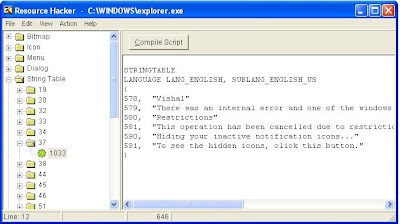
1.5)Navigate to String Table -> 37 -> 1033 in the left pane of 'Resource Hacker'


1.6) In Right pane on line no 578 select the start text and rename it with your name along with the double quotes. 'Vishal' in this case. Click on 'Compile Script' and then save the file as 'vishalexplorer.exe' in C:\WINDOWS\ directory


2.0)REGISTRY EDITING:

WARNING: PLEASE DONT MODIFY ANY REGISTRY SETTINGS OTHER THAN THIS AS IT CAN MAKE YOUR PC UNUSABLE.


2.1) Open Run from Start menu Start -> Run. Type regedit.exe in run dialog box and press Ok.


2.2) In 'Registry Editor' in left pane Navigate to HKEY_LOCAL_MACHINE\SOFTWARE\Microsoft\WindowsNT\CurrentVersion\Winlogon


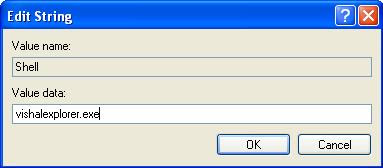
2.3) Click on Winlogon and in right pane search for " Shell "having Data 'explorer.exe'.
Modify it to 'vishalexplorer.exe'.


2.4) Close Registry Editor.

3.0) Restart your computer. And the result is:

Technology & Computers